Dental practices that switch from SMS to WhatsApp typically see message open rates jump from around 20% to above 95%. Patients already live inside WhatsApp — yet most clinics are still using the consumer app or the WhatsApp Business app, neither of which was designed for automated, compliant, multi-user messaging at clinic scale. The answer is the WhatsApp Business API (WABA), Meta's enterprise-grade channel for sending template messages, automating reminders, and integrating WhatsApp into your dental appointment reminder software. This guide walks through the WhatsApp Business API for dentists end to end: verification, templates, opt-in rules, pricing, architecture, rejection pitfalls, and multi-location setup — without the developer headache.
What is the WhatsApp Business API — and why dentists need it
There are three flavors of WhatsApp for business, and only one of them is appropriate for a clinic:
- Consumer WhatsApp — the app on your phone. Not meant for clinics. No automation, one device, no proper audit trail, no separation between personal and clinical chats.
- WhatsApp Business app — free, aimed at solopreneurs and small shops. Still single-device, still no automation, still no programmatic sending.
- WhatsApp Business API (WABA) — Meta's enterprise channel. No app — it's an API. Supports automated sending, multi-agent inboxes, templates, webhooks, analytics, delivery reporting, and a verified business identity.
For a dental practice, only WABA scales. You cannot manually text 400 patients a week from a phone, and you shouldn't — the legal trail, the privacy exposure, and the hygiene of separating personal and clinical conversations all argue for a proper channel. WABA is also the only version that powers WhatsApp appointment reminders for dentists sent automatically from your practice management software.
The green-tick: what it is, how to get it, why it matters
The green-tick verification badge next to your clinic name on WhatsApp is Meta's way of saying "this business is who it claims to be." Patients see it in the chat header, and trust goes up instantly — especially for anything involving personal health data.
Green-tick verification is not automatic and not guaranteed. Meta looks at:
- Brand presence outside WhatsApp. Press coverage, a well-ranked website, consistent listings on Google Business Profile, Bing Places, and review sites. A new clinic with a thin online footprint often gets rejected the first time.
- A verified Meta Business Manager account. You (or your BSP) must complete Meta business verification first — tax documents, utility bills, domain ownership.
- Name match. The display name you request must match your legal or publicly used brand name. "Dr Smith's Dental" is fine; creative marketing variants are not.
- Unique public phone number. The number tied to the WABA must match the one on your website, invoices, and Google Business Profile.
If you're rejected the first time, you can reapply after 30 days. Most clinics that meet the brand-presence bar get green-tick verification within two to six weeks.
Template message categories: utility, authentication, marketing
You cannot send free-form messages to a patient until they first message you (the 24-hour customer service window). For everything outside that window — reminders, confirmations, recalls — you must use pre-approved WhatsApp template messages. Meta puts templates into three categories:
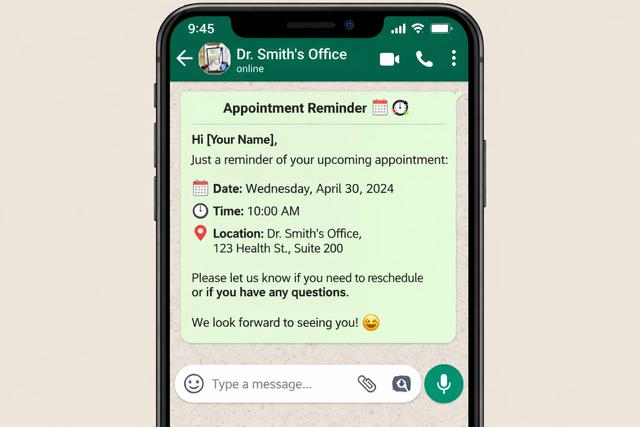
- Utility — transactional, non-promotional messages tied to an existing transaction or appointment. Appointment reminders, confirmations, reschedules, post-op instructions. This is 95% of what a dental clinic sends.
- Authentication — one-time passwords. Rarely used by clinics directly, but relevant if you run a patient portal.
- Marketing — anything promotional, including offers, cross-sells, seasonal campaigns, or recall messages that push a specific product. Subject to stricter opt-in rules and higher per-conversation pricing.
Concrete dental examples:
- Utility: "Hi {{1}}, this is a reminder of your appointment at {{2}} on {{3}}. Reply CONFIRM or RESCHEDULE."
- Utility: "Hi {{1}}, your hygienist {{2}} is ready for your cleaning. Please arrive 10 minutes early."
- Marketing: "Hi {{1}}, it's been 6 months since your last cleaning — book your $99 recall visit this month."
Misclassifying a marketing template as utility is the single biggest reason templates get rejected or, worse, lead to account penalties. When you're unsure, default to marketing; the pricing difference is small compared to a paused WABA.
Opt-in requirements — the hard legal line
WhatsApp's commerce and messaging policies require prior opt-in before you send any template message. On top of that, if you operate in the EU (GDPR), the US (HIPAA), or Brazil (LGPD), you have additional legal obligations. Treat opt-in as a legal requirement, not a preference.
"Prior opt-in" in practice means the patient has:
- Explicitly agreed to receive WhatsApp messages from your clinic, and
- Been told what kinds of messages to expect — reminders, recalls, post-op instructions.
The cleanest way to capture this is on your intake form or booking page, with a clear checkbox and wording like:
"I consent to receive appointment reminders and clinical communications from [Clinic Name] via SMS and WhatsApp. I understand I can opt out at any time by replying STOP."
Keep a timestamped record of the consent — Meta, and regulators, can ask for it. Also give patients a frictionless way to opt out, and log every opt-out. For the deeper regulatory picture — PHI minimization, BAAs, EU legal basis, LGPD rules — read our primer on GDPR/HIPAA and reminders.
Pricing across your patient geography
WhatsApp Business API uses a conversation-based pricing model. A "conversation" is a 24-hour session between your clinic and a patient. You are billed per conversation, not per message, and the rate depends on two variables: the country and the conversation category.
Meta updates these rates regularly, so treat the numbers below as directional — always check current rates in your Meta Business Manager before you model spend.
Rough ballpark for utility conversations (per conversation, USD):
- Mexico — ~$0.036
- Brazil — ~$0.035
- Spain — ~$0.032
- Italy — ~$0.037
- India — ~$0.003
- United Arab Emirates — ~$0.034
Marketing conversations typically cost 2–3× the utility rate. Authentication sits between the two.
Quick math on WhatsApp pricing for dentists — a typical 3-chair practice in Italy running utility reminders across 600 patient touchpoints per month (reminders, confirmations, recalls): ~600 × $0.037 ≈ $22/month. A 6-chair bilingual practice in Texas serving mostly Mexican patients at ~1,400 touchpoints: roughly $50/month. Even aggressive reminder cadences rarely exceed the cost of a single recovered no-show.
Technical architecture — what you don't have to build yourself
Officially, there are two ways onto WABA:
- Direct Meta Cloud API — you host everything, manage tokens, templates, webhooks, media, retries, number provisioning, and Business Manager.
- Via a Business Solution Provider (BSP) — a vendor with a pre-integrated platform.
Even if you're technically inclined, direct Cloud API is a bad use of a dental practice's time. You'd be rebuilding:
- Webhook infrastructure for delivery receipts, read receipts, and inbound messages
- Template submission, versioning, and approval tracking
- Media hosting for images (x-rays, aftercare PDFs) with signed URLs and expiring tokens
- Retry logic for transient 5xx failures and rate limits
- Phone number hosting and SMS fallback for undelivered messages
- A multi-agent inbox with audit logging
- A HIPAA-sensitive data layer that keeps PHI off WhatsApp in plain form
DodoDentist acts as your BSP-plus-practice-management layer: green-tick application support, a vetted template library, automatic approval flow, and the HIPAA-sensitive data layer. In practice, only the minimum necessary data — first name, appointment time, clinic name — ever transits WhatsApp; clinical detail stays inside the encrypted clinic record. If you're planning the actual rollout, our practical guide on how to send WhatsApp reminders to dental patients walks through the concrete steps.
Common rejection reasons and how to avoid them
Template review is where most first-time WhatsApp Business API setup projects stall. The same five mistakes account for almost every rejection:
- Promotional content in a utility template. "Get a free whitening with your next cleaning" inside a reminder template will be re-categorized as marketing or rejected outright. Keep utility templates strictly transactional.
- Missing or unused variables. If your template has
{{1}},{{2}},{{3}}, you must substitute all three at send time. Leaving{{3}}empty triggers a delivery failure. - URL shorteners. bit.ly, tinyurl, and similar domains are frequently flagged. Use your own clinic domain or a branded short link.
- Formatting issues. Trailing whitespace, unexpected line breaks, emojis in the wrong category, or variables wrapped in punctuation (
"{{1}}".) all trip the reviewer. - Policy violations. Asking for payment card numbers, sensitive PHI in plain text, or anything a reasonable patient might flag as spam. When in doubt, strip it back and be boring.
If a template is rejected, fix the underlying issue and resubmit — never re-submit the same text hoping for a different reviewer. Meta reviews are logged per template name.
Multi-clinic / multi-location considerations
If you run a group, the question is whether to use a single shared WABA with one display name and one number, or one WABA per location with separate numbers and green-ticks.
Rule of thumb:
- Single shared WABA — works if all locations share one brand, one legal entity, and one patient-facing phone number. Simpler Business Manager, one green-tick application, shared template library. Best for a brand-first group.
- Separate WABAs per location — works if each location has its own legal entity, local brand, or distinct patient base (different languages, different regions). Each location gets its own green-tick and its own number, which patients recognize as local.
For multi-location WhatsApp, a hybrid is common: one Business Manager at the group level, multiple phone numbers under it, and a template library that each location can clone and localize. A good BSP lets you scope templates, inboxes, and reporting by location without forcing you into one extreme.
Also plan number strategy. Once a number is on WABA, it cannot receive regular SMS or voice calls. Port only numbers you are willing to dedicate, or provision new ones through Meta Cloud.
The bottom line
WhatsApp Business API for dentists is no longer exotic infrastructure — it is the communication channel patients expect. The setup has real moving parts (green-tick verification, template categories, opt-in rules, pricing, architecture, rejection pitfalls, multi-location strategy), but none of it needs to live on your practice's to-do list. A good BSP abstracts every piece we've covered here and leaves you with what actually matters: fewer no-shows, happier patients, and a compliance story you can defend.
Book a free 15-minute WhatsApp Business API setup call with the DodoDentist team — we will assess your green-tick readiness, map your template library, and have your first automated reminder sending in under a week. Get started with DodoDentist.